
Constellation can transmit up to five simultaneous MIDI messages per Satellite via USB or the standard MIDI DIN-5 connector.
macOS Setup [Troubleshooting] #
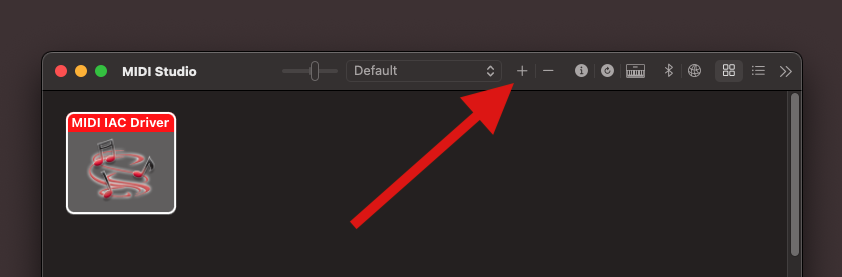
If you’re using macOS and Constellation isn’t automatically recognized as a MIDI device after connecting via USB, make sure an external MIDI device is present in your MIDI Studio:
- Open Audio MIDI Setup (Search “Audio MIDI Setup” in Spotlight).
- Go to Window → Show MIDI Studio.
- If no external MIDI device is listed, click the plus (+) button to create one.
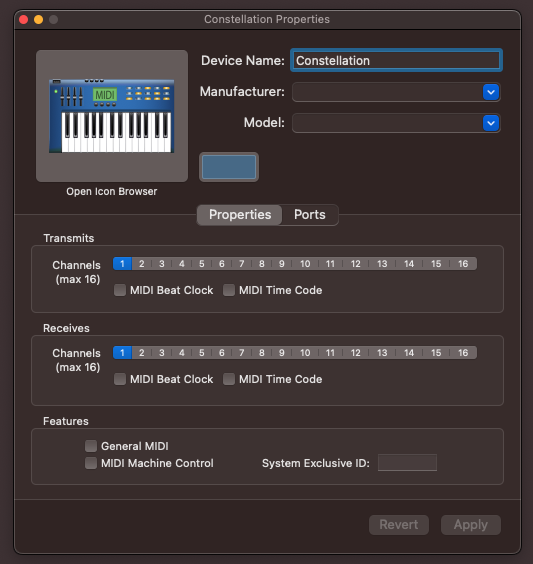
Once your external MIDI device is created, you can configure its transmit and receive channels and assign it a custom name. This device will act as the communication bridge between Constellation and your virtual environment / MIDI instrument.
Windows Setup #
Constellation should be recognized as a MIDI interface automatically in Windows 10 and 11 – No drivers required.