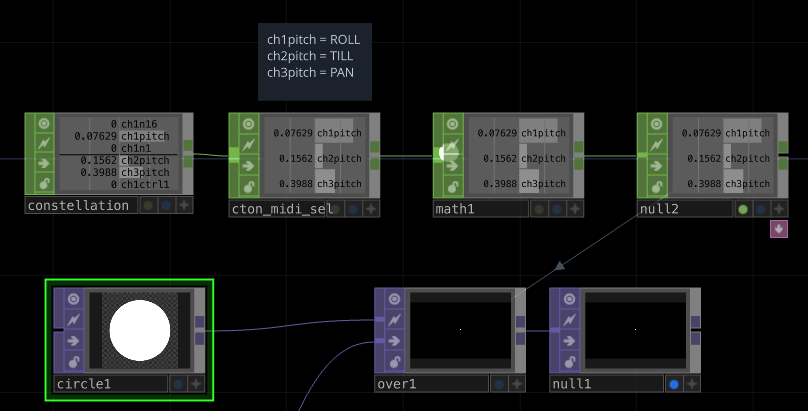
In TouchDesigner, you can use motion data captured by the Satellite devices to control parameters via the MIDI In CHOP operator in your TouchDesigner network.
After your system recognizes the Ground Central as a MIDI device, follow these steps in TouchDesigner:
- Open your TouchDesigner project.
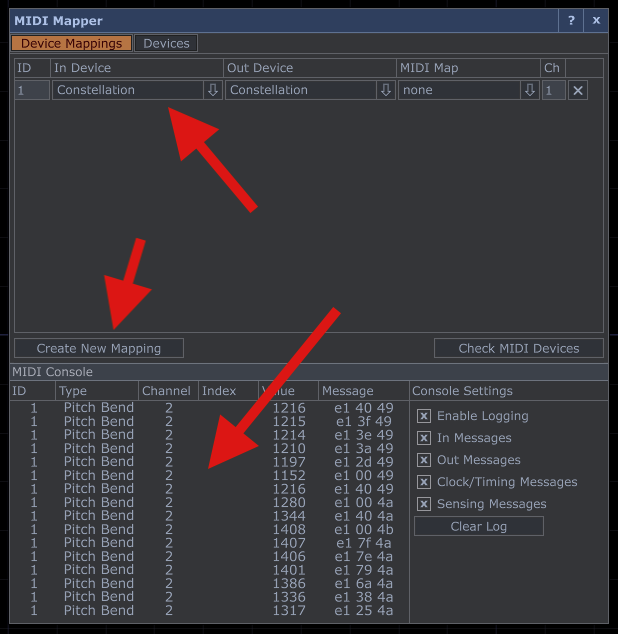
- Navigate to the MIDI Device Mapper (Dialog).
- Create a new MIDI mapping.
- Set your Constellation MIDI device as both the input and output device.
If your Satellite is paired and you’ve enabled MIDI messages in Ground Central’s settings, you should begin seeing MIDI data populate the MIDI Console within the MIDI Mapper dialog.
Now return to your TouchDesigner network:
- Press Tab to open the operator menu.
- Create a MIDI In CHOP operator.
That’s it! You should now see real-time MIDI data streaming from Ground Central into the operator. From here, you can connect and map this output to control any transform, effect, or parameter within your TouchDesigner project.